Saludos, tengo una duda con respecto a tu suscripción de patreon, si me suscribo puedo utilizar y vender los archivos de diferentes programas que ofreces? o solo abarca uno?
Dear Interraptor!
First of all, I want to say that you create wonderful models!
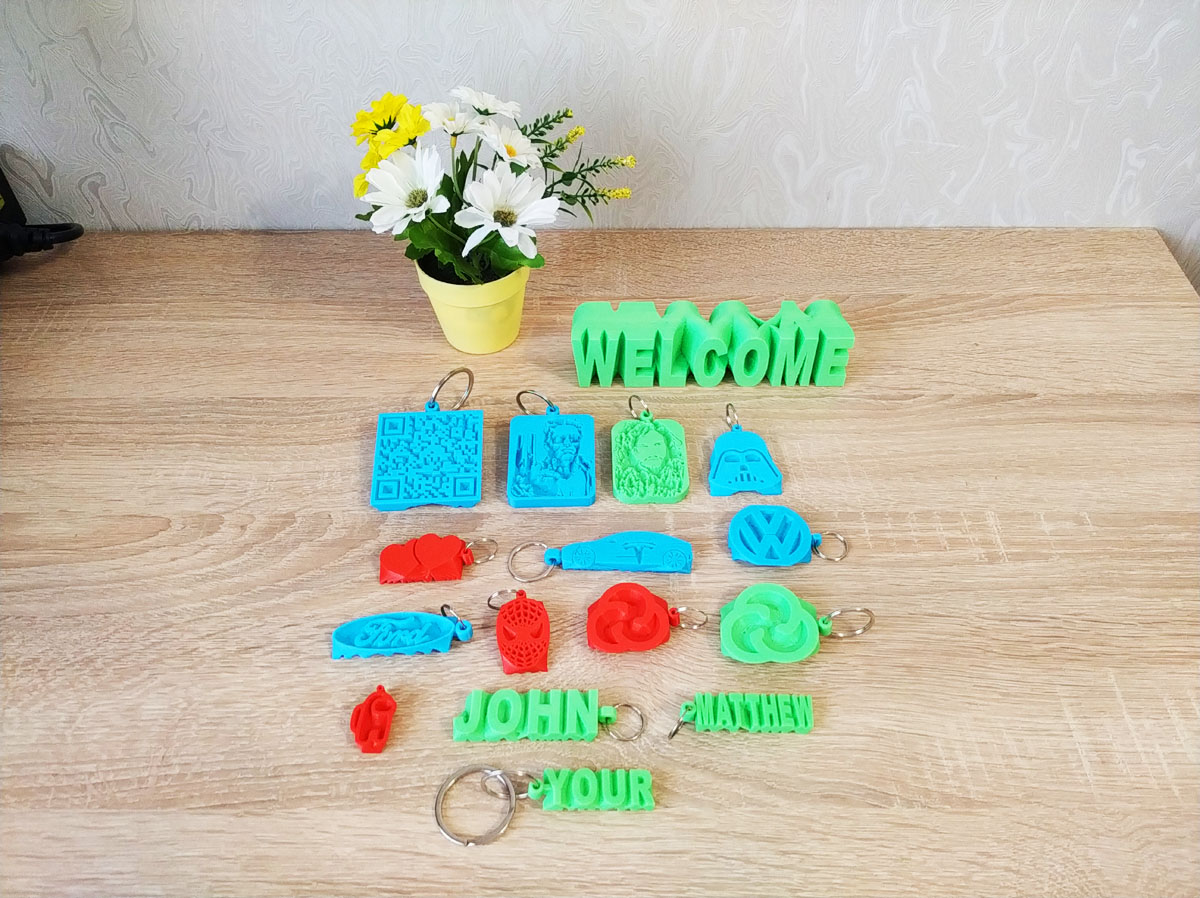
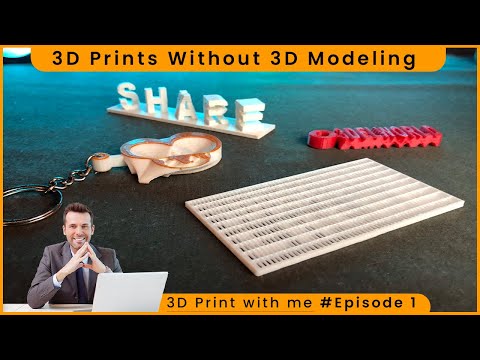
Thank you for your interest in my programs! On Printables I have posted a simplified version of this program, which allows to create only a table frame. The full version of the program on Cults allows to create 10 types of decorative objects: https://cults3d.com/en/3d-model/gadget/app-to-create-decorations
Dear Jayz5! Thank you for your kind words!
For commercial use of the programs you must be an active subscriber on Patreon for 5 USD/month.
You will be able to sell both the STL created by the program on platforms like Cults. And things printed on a 3D printer based on these STL.
Moreover, if you purchase there an annual subscription for 50 USD, you will receive not only 15 already released programs, but also 6-10 new programs that will be released this year.
Dear Antworm! Thank you for downloading the program!
Please note that the program does not freeze. It is normal that the update of debug graphics may stop.
However, the program continues to work, and in 100% of cases "comes to life", displays the message "Done" on the screen, and writes the file amazing.stl to the same folder where the program is located.
Please, just leave the program to work for 2-10 minutes (as it is written about the "quality" mode), not paying attention to the fact that it looks like it is frozen. Until the message "Ready" appears.
Dear Pakillo2! Thank you for downloading the program!
Can I ask you to send me a photo to better understand the problem? posmetyen@yahoo.com
This program ASC4 is the most popular of my programs, it is used by over 2000 people and usually the names are clearly visible. Maybe you are right and it is necessary to do something simple to get good prints.
Dear Rabegava!
Thank you very much for using the program and for the kind words!
I absolutely agree that the main drawback of the program is that we can only use English letters. Probably about 60% of visitors to the Cults platform would like to use their national fonts. Therefore, I have planned to improve this program - to make it possible to use national fonts (once those who buy the program, they will receive updates for free). I can not promise an exact date, since I have to continue to release new programs to keep up with modern trends.
In addition, I plan to soon release a separate program "Amazing STL Creator 21: TextWizard", which will be able to use any fonts and create 10-20 amazing things from such text.
At the moment, it is possible to use national fonts in a more complicated way - first make a JPG with text (in any graphic editor), and then upload the image to the ASC4 program.
Thank you very much for your kind words! )
Usually, if people like the program, they go to use it and they have no time to write a message)
So thank you for taking the time to write!
Dear Urielriba! Thank you for your interest in my programs!
The program creates a regular STL file; it does not contain information about colors.
But because the keychain is flat, you can print amazing multi-color keychains on regular single-color printers. Here's a friend of mine typing this: https://ibb.co/82yDPv5
You can print the bottom layers in one color, then pause the printing, change the plastic, print the middle layers in a second color, and the top layers in a third color.
But you gave a good idea, now more and more people have multi-color 3D printers like Bambu, and maybe I’ll add to the programs the ability to create color 3D models right away.
Thank you!
I use PLA, it is more environmentally friendly, safe for children, and the parts are durable and do not crack.
Strings can form not only due to poor retraction. It may help if you reduce the melting temperature of the plastic (from 220 to 200°C), turn on the fan blowing the printed object (or check that the fan has not failed). Changing the type of plastic may also help. I love ESUN plastic, I have about 30 colors and types. But the red ESUN produces strings, but all the others do not (probably something in the red dye)
If you think there is a problem with the retract, you can change a couple of retract parameters in the slicer. For example, I now have a retraction distance of 6 mm, a retraction speed of 40 mm/s.
The program may have already worked for you, but I will write what to do if an "access denied" error occurs.
1) After finishing the processing, the program places the Amazing.stl file in the same folder where the program itself is located. You may be running the program from a zip archive, and the program is trying to write the results file back into the archive. It is best to first unzip the program into any folder, for example D:/Amazing/.
2) For some users who encounter this error, the application starts working when they select “run as administrator”.
Please try this and if it doesn't work, please message me.
Thank you for your feedback!
Dear Pokeromero! Thank you for downloading the app to create keychains!
This is the most popular among my 12 programs: more than 3000 people use this program.
Could it be that when you start the program, a Windows warning like this appears? https://ibb.co/vxtWkzM
To solve this problem you could click “More info” and “Run anyway”
Thank you very much! If this is your channel 'Kady 3d printing'i, then I am absolutely a fan) Thank you for making such wonderful videos! I watch and like regularly!
Dear Kobosiek! Thank you for downloading the program!
Please forgive me that I couldn't answer you quickly enough
1) If there is a lot of text (2 lines), then it is better to print the text at the bottom, the QRcode at the top. If there is only one line of text, then it is better to print the QRcode at the bottom, the text at the top, so that there is a reliable foundation.
2) Please first invert the colors of the QR code image in some graphics editor (because the black color of the image will become the peaks of the keychain surface).
3) The QR code may be difficult to recognize if it is printed by too dark or translucent plastic. It is best to print by light green, light blue, pink and other light colored plastics.
4) As an option, you can print the quarcode from plastic in two colors: light and dark. Almost all 3D printers allow to pause the printing process and replace the plastic. In this case, you need to use the original, non-inverted QR code image
Dear Batussss! Thank you for downloading the program!
The "access violation" error usually occurs when the program does not have enough RAM. When running, the program uses about 150 MB of memory, in addition, 50...250 MB is the size of the created STL file. Could it be that your computer has low RAM?
Do the mode (fast/high-quality) or the type of input data (text/image) somehow affect the appearance of the error?
Dear Batussss! Thank you for your regular feedback! Please explain in more detail why the bottom part is not straight: the model or the printer settings? Perhaps you can show a photo of the problem (you can upload the picture to the imgb service and provide a link to it here)
I think this is due to the fact that the program creates an image on the bottom and top side of the keychain. And when the slicer creates the bottom layer, it creates a complex intersection of lines.
Dear Ggntecnicofrio! Thank you for downloading the app!
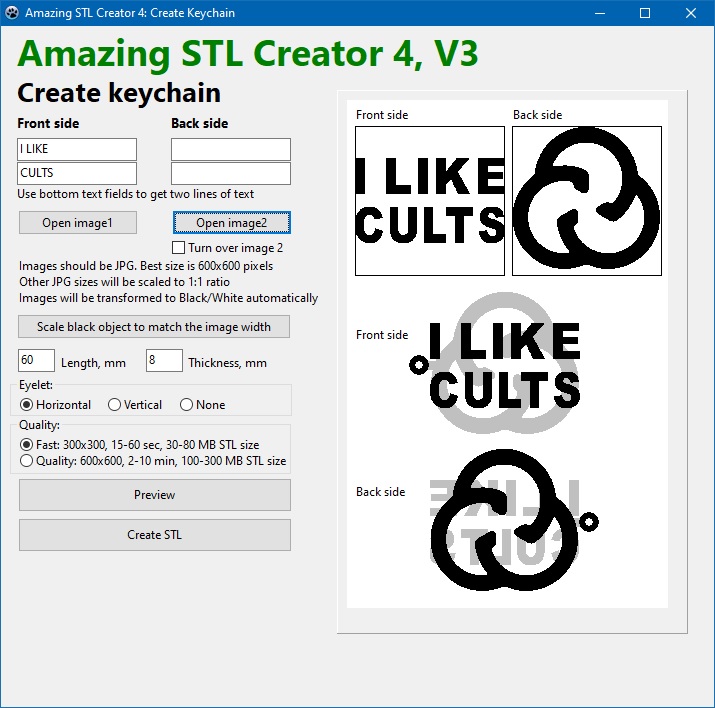
This circle is the eyelet of the keychain. If only it remains, then the image or text was not loaded. Please check that an image has been uploaded for both sides of the keychain (in JPG format) or text entered.
Dear DripMartShop! Thank you for downloading the program! Thank you for appreciating the idea!
Can you get such a standard Windows warning that you are running an EXE file? (this is Windows 10). https://ibb.co/mGBWJ8g
In this case, you need to choose "More info" and then "Run anyway".
This is a normal situation when Windows does not allow to immediately run the EXE file and asks to confirm this. This is similar to how for each mobile application for a smartphone we have to confirm that we agree to use the camera, microphone, location, and others.
if you have a different type of problem, please write me what kind of message appears, after which the programs do not work?
Dear Pablo90! Thank you for downloading the program!
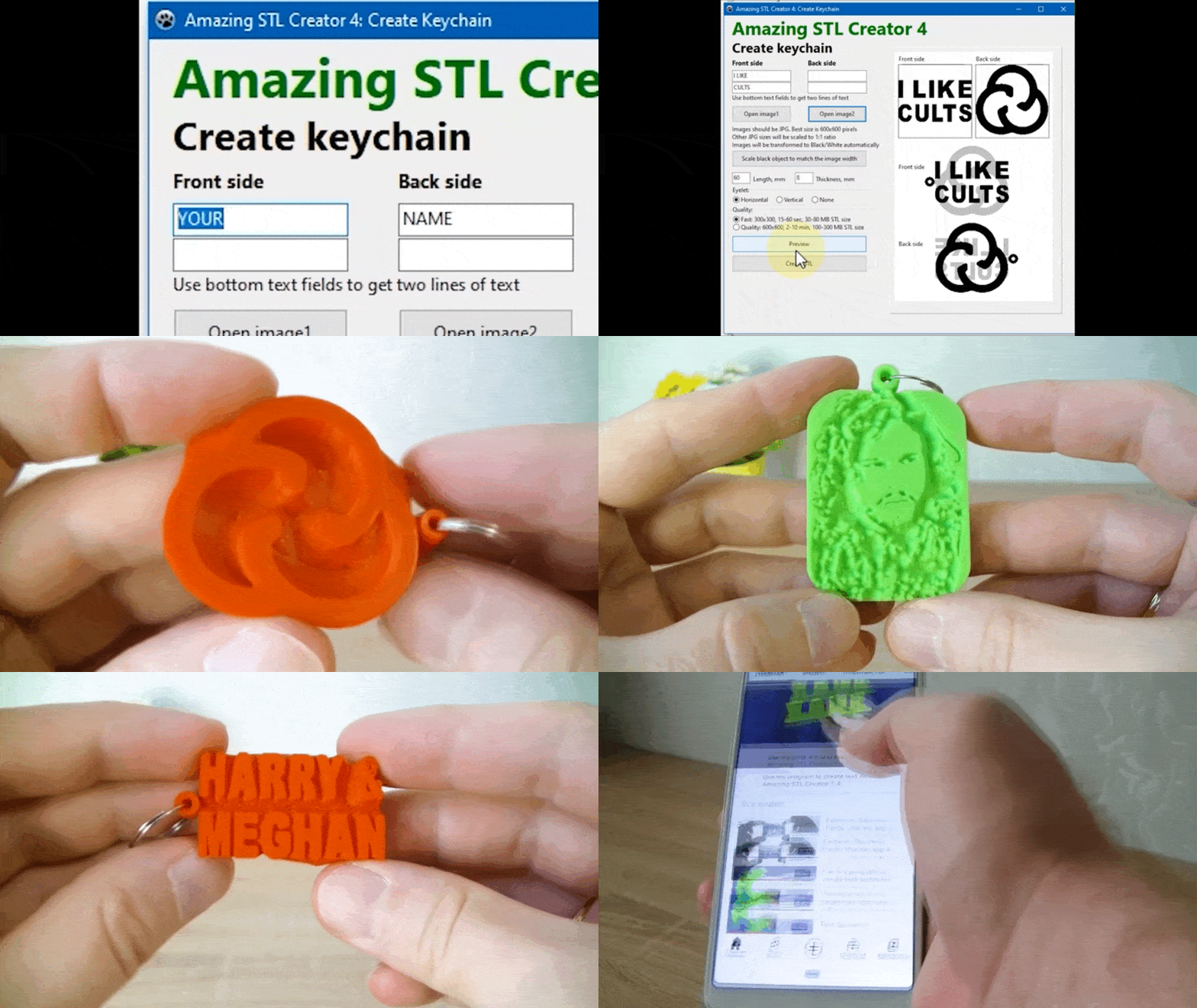
In basic mode, the program works very simply:
1) enter text in the boxes
2) click the "Create STL" button
3) after 1 minute, the program will create an amazing.stl file in the same folder where the program is located.
Instead of text, you can upload JPGs
All other parameters are more fine tuning.
If you have any questions, I will be happy to explain
bonjour nj'ai bien achete Amazing STL Creator 4 - Keychain mais mon rendu est flou et plein de defaut pourtant mes autres realisation sont impeccables. Pourtant image silhouette 600X600 deux prenoms au dos mais sur les cotés cela me fait un escalier et la finition bien que le lissage soit activer n'est pas beau du tout cordialement Patrick
Dear Patrick! Thank you for using the program! The program uses voxel technology, and the object formed by the program consists of 600x600x50 cubes. This object may look jagged in the viewer or slicer, but when printed, especially at a small size, it looks quite smooth. Large sampling (for example, 1200x1200x100) would lead to a sharp increase in computation time (by a factor of 10) and a sharp increase in the opening time in viewers and slicers (by a factor of 10)
Good day i was wondering when the update will be available as the problems below is still present. The idea of the app is amaizing just has a few bugs.
The keychain program, as far as I understand, is most liked by people, so I am interested in fixing problems in it the most.
Please tell me what problem in this program bothers you the most? I may not be able to fix all the bugs quickly (some are non-critical but would take a very long time to fix), but if it's one bug, I'll be able to release an improved version in the coming days.
I bought this program downloaded it put names in and then click create STL but then stops at 97% and then comes with a warning to click ok or abort any1 help I bought the other programs I hope they are not the same.
Dear Leeullah! Thank you very much for downloading my programs!
Such an error may occur when the program cannot write the Amazing.stl file with the results of the work.
For maximum simplicity, the program writes the results to "Amazing.stl" file in the same folder where the program itself is located.
Please make sure that the Amazing.stl file is not open in another program, in this case the Amazing STL Creator program will not be able to overwrite the file.
Also, you may be running the program from an archive, and the program is unable to write the Amazing.stl file back to the archive.
If so, please copy the program to any new folder on your computer, for example D:\Amazing\
Please write me if this does not solve your problem.
Dear Kastru94! Thank you for downloading the program! Please excuse me that you had to use a different slicer. Thank you for telling me about the Lychee slicer, I will point it out to other people so that they are sure that the slicer will work fine for them.
Dear IceCubeOnFire! Yes, I just uploaded an updated version (V3) of the program that solves this problem. You can download the new version for free from this page.
I think I will add the ability to set the eyelet diameter in the next version of the program
But even in this version, it is possible to change the diameter: if you select the high quality mode, the diameter of the eyelet becomes 2 times smaller than in low quality.
Dear TrofJE! Thank you very much for downloading the program!
Please excuse that the program does not work for non-English characters. I'm working on making this possible in my programs so that you can then just re-download the new version for free.
In the meantime, in this version you can create an image in 'Paint' or 'Photoshop', write any characters there, and then load this image into this program.
Dear Nachseba! Thank you very much for downloading the program!
Please excuse that the program does not work for non-English characters. I'm working on making this possible in my programs so that you can then just re-download the new version for free.
In the meantime, in this version you can create an image in 'Paint' or 'Photoshop', write any characters there, and then load this image into this program.
I am having trouble with using 600x600 images and text. The program will work fine with fast render, but quality will not render with a single line of text a donut shaped stl is generated. if a double line of text is used, the program renders fine.
any ideas?
Dear Rananna! Thank you for donwloading the programs! I was able to reproduce this error myself. It was not so much a donut as an enlarged eyelet. Yes, such an error occurs with some combination of a picture and text in one line. Thank you for finding this problemI will try to correct the program today and you can redownload the new version of the program.
Dear Rananna! Dear DellWillams! I just uploaded an updated version (V3) of the program that solves the 'donut' problem. You can download the new version for free from this page.
Gefällt dir Cults und möchtest du uns dabei helfen,das Abenteuer in völliger Unabhängigkeit fortzusetzen? Beachte, dass wir ein kleines Team von 4 Personen sind und dass es daher sehr einfach ist, uns dabei zu unterstützen, weiterhin im Geschäft zu bleiben und zukünftige Entwicklungen zu schaffen. Hier sind 3 Lösungen, die allen zugänglich sind:
WERBUNG: Deaktiviere deinen Werbeblocker.
SPENDE: Wenn du möchtest, hast du die Möglichkeit, uns hier über Ko-FI eine Spende zukommen zu lassen
Spenden
MUNDPROPAGANDA: Lade deine Freunde dazu ein, die Website und die großartigen 3D-Dateien kennenzulernen, die von der Community geteilt werden!
Das Teilen und Hochladen auf Cults3D garantiert, dass die Designs in den Händen der Maker-Gemeinschaft bleiben! Und nicht in den Händen der Riesen der 3D-Druck- oder Softwarebranche, die die Konkurrenzplattformen besitzen und die Designs für ihre eigenen kommerziellen Interessen ausnutzen.
Cults3D ist eine unabhängige, selbstfinanzierte Website, die keinem Investor oder keiner Marke verpflichtet ist. Fast alle Einnahmen der Website gehen an die Maker der Plattform. Die auf der Seite veröffentlichten Inhalte dienen nur den Interessen ihrer Autoren und nicht denen von 3D-Druckermarken, die auch den Markt für 3D-Modellierung kontrollieren möchten.
:format(webp)/https://fbi.cults3d.com/uploaders/21499273/illustration-file/3be67fbd-72b7-48bb-ac9a-a07c3d63a37b/trailer.gif)

/https://preview3d-images.cults3d.com/xu1emset4h5j7931fd2h2fcal2pr)










:format(webp)/https://fbi.cults3d.com/uploaders/21499273/illustration-file/dff54593-1ec9-4c5f-9aa7-2fafc9a1d4db/Trailer.gif)
:format(webp)/https://fbi.cults3d.com/uploaders/21499273/illustration-file/73583eab-317d-4f1e-b207-2de1ff17dc7b/Trailer.gif)
:format(webp)/https://fbi.cults3d.com/uploaders/21499273/illustration-file/545265f1-f629-4394-9575-e8c41982f1fa/Trailer3.gif)
:format(webp)/https://fbi.cults3d.com/uploaders/21499273/illustration-file/35fba5d6-4ebf-497c-b647-4462e2c1304f/_Trailer.gif)
:format(webp)/https://fbi.cults3d.com/uploaders/21499273/illustration-file/41e55129-d93c-4c65-98e6-593ba0b8f670/Trailer.gif)
:still()/https://fbi.cults3d.com/uploaders/21499273/illustration-file/7cc42880-f3f9-4977-b546-275c134ea28c/Trailer.gif)
:still()/https://fbi.cults3d.com/uploaders/21499273/illustration-file/82dad4cd-0c5c-46cb-a2a9-902225d38950/Trailer.gif)
:still()/https://fbi.cults3d.com/uploaders/21499273/illustration-file/298cc13a-2f47-4863-bd4c-79404c01c912/_Trailer-600.gif)
Saludos, tengo una duda con respecto a tu suscripción de patreon, si me suscribo puedo utilizar y vender los archivos de diferentes programas que ofreces? o solo abarca uno?
Dear Ing_UC_10! Thank you for your interest in my programs!
Yes, as long as you have an active patreon subscription, you can sell STL files (or 3D prints from them) created by any number of my programs.
I'd be glad to see you on Patreon ; )