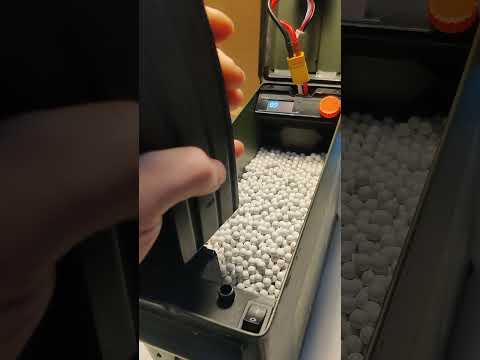
My screen freezes while I'm working and the engine keeps running. How can I solve this problem?
- 0 me gustas
🔫 Los modelos 3D de pistolas o armas son objetos ficticios o juguetes y no tienen ninguna funcionalidad real como armas. Están destinados únicamente a fines de entretenimiento o decorativos. Para cualquier diseño contrario a nuestros T&Cs, por favor report.
| Licencia | |
|---|---|
| Usos | |
| Formato de diseño 3D |
9 archivos (PDF, STL, y ZIP) Cerrar
|
| Última actualización | |
| Fecha de publicación | |
| Número de diseño | 1875409 |

My screen freezes while I'm working and the engine keeps running. How can I solve this problem?
Hi, this is a new issue that have begun to come up. I even got it on my new loader. I suspect some screens are of lower quality.
But i do have a fix for it that have worked on mine and others loaders.
You need to add
2x - 4.7-5.1k resistor
1 between the 5v and A4(SDA)
and
1 between the 5v and A5(SCL)
This should resolve your issue.
Sorry cant open that link.
here is a link of a sketch i made
https://drive.google.com/file/d/1iMMKidlzaqiOA2Ww139WRLiUHDeVF6Gy/view?usp=sharing
This isn't a viable option... you either need two power sources or suppress the engine interference with stabilizers.
ok, but it does work.
The screen is the one that freezes and not letting the Arduino continue.
The resistors stabilizes it.
Where can I get a counter ring for the new wheel and the Beta files, basic version\Feeding Wheels folder? It's bigger and the old one doesn't fit. https://ibb.co/cczM6f9j
it's in Beta files, "advanced version\Counting Wheels"
you are looking in the basic version download.
The counting wheels are for advanced version.
Do the same for advanced riders. This wheel is very convenient.
Sorry, not sure what you just said. Advanced riders?
I'd recommend a pro version with a feed wheel like this. It's more reliable.
I might just be misunderstanding you. I'm sorry if so.
But the wheel you sent a picture off is in the advanced version. under Beta files
Nothing helps... neither the capacitor nor the resistors, it freezes whenever it wants (((( https://ibb.co/JWmgtmWr
Then I'm sorry to say that I don't know what could be causing it.
With the previous people that had this problem, and one of my own loaders, this was the solution and fixed it right up.
Never got the freeze again.
I was able to overcome the freezes only by adding this BNX016-01 filter to the screen power line.
Huh, well done and thanks for telling me and other that might get the same problem.
I made my final Box for your Speedloader. I used the parametric rugged box and a version with a Parkside x20v adapter
https://www.thingiverse.com/thing:7178085
i also added a version with a handle
i added a notch in your Main_boy for the new cablemanagment. I hope it is okay.
Looks good, well done. :)
Hello, is there a way that i can see the needed electronics before buying the file?
The loading wheels are crushed no matter what filament I use. Do you have any suggestions?
This is a hard one.
There have been many different results for people.
Personally I have both PETG and PLA+ wheels that have been working for over a year now.
What I usually do is 6 walls, 25 infill. But the "teeth" of the wheel isn't big enough for 6 walls, so I don't know how much it really does for strength. Maybe print a little hotter for better layer adhesion could help.
I used many different materials. However, the gears are crushed. I produced 12 of them and they are actively used. But I couldn't solve this problem.
That sad to hear.
After I've released my next loader I will make an upgrade for my older ones. An anti clog wheel and nub, that would help with wear and tear that might happen during BBs getting to the wheel and down the chute. But wear and tear from loading mags is harder.
Sadly I have no idea what could be the cause. As I've printed on wheels on 3 different printers and all with the same result.
Maybe something is misaligned and cause extra wear and tear.
Let me do some review and I will follow the new model
When uploading the Arduino file, it gives this error:
Compilation error: Versatile_RotaryEncoder.h: No such file or directory
Unfortunately, I cannot program it. I uploaded what you gave me without any changes.
Hi!
You are missing the libraries in Arduino IDE.
In the manual there should be a section about installing libraries and what libraries needed.
Hope this helps you and please tell me if you still experience problems.
Hi, I hope you’re doing well. I’ve just finished assembling the box and wiring, but I’m not sure if I made a mistake somewhere. I’ve gone through everything three times, and when I turn on the box, everything powers up as it should...except when I press the rockerswitch button down to start the motor. The relay light comes on, but the motor doesn’t spin.
Is there a neater wiring diagram available, or could I be missing something? This is my first wiring project, and it’s been really fun learning new things along the way.
Sorry I ment the micro switch with roller arm not the rocker switch
Sorry i dont really have a neater diagram than the ones provided in the manual.
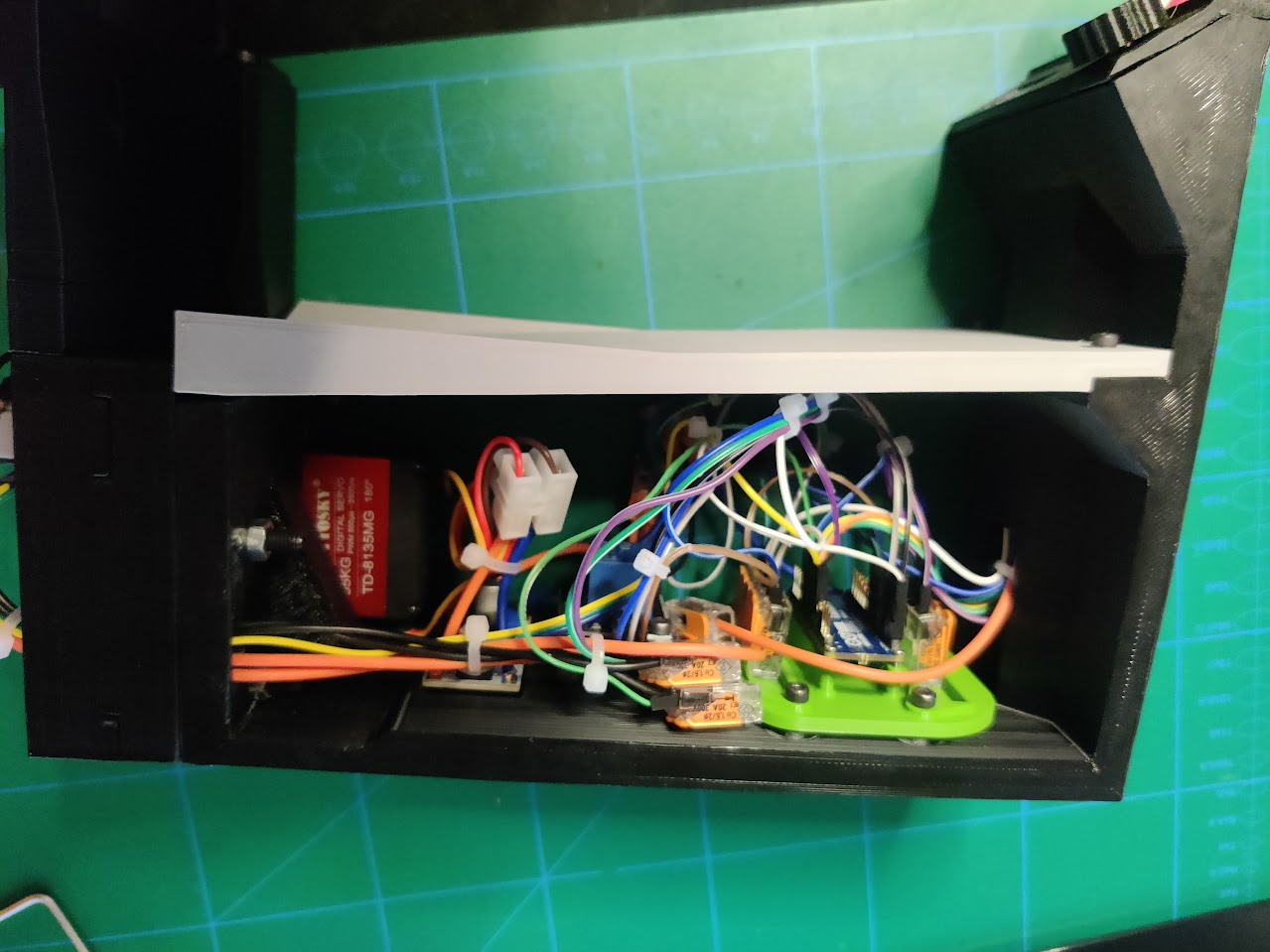
There could be a wire without proper connection. Like if you are using a WAGO wire clamp, it might have clamped down on the isolation plastic around the core, instead of the metal.
Go over the wiring and see if there is proper connection.
If you have a multimeter tool, it would help you see if everything connects as it should.
That is what i think is the most probable cause of this.
Sorry for the late response, I have been away or your comment took a while to be approved by cults.
Hope this help and good luck.
Please tell me how it works out. :)
Hey no worries about the late response, ill go over the wiring again during the week, I think I have a mate who has a multi meter tool that I'll try borrow, I do think I might be a loose connection somewhere
It most likely is. I've been a victim to that so many times.
Hey Bub, just wanted to say I got it all working now, I was a loose wire🤘🏼thank so much for the amazing files, ill do a post of it completed when I get a chance
Amazing to hear! Thanks for the update.
"Beta" feeding wheel question: 14,15 or 16 teeth - is there any experience on which one to choose in regards of being more proof to failure than the others? I could have mine CNC machined by a friend, so I wonder which one to choose. Thx!
16 have worked very well for me. And if you are going to use cnc, no need to go lower.
Fair warning, I'm working on a new loader with some upgrades. Some upgrades will come for this one as well and the wheel will change a little bit. But it's hard for me to say when. At least not for a month or two.
Cool thanks for the heads up. Are you talking about your “Midi” project? Can your reveal whether it will use the hardware that is also used for this model here? On instagram you mentioned a 360 servo but will the other hardware like switches and voltage regulator be the same?
Yes the Midi project. It will use some of the same hardware.
It will use the 60kg motor. It will be somewhat backwards compatible, so the old 60kg motor will work, but I recommend the new motor.
Same switch for the press down mechanics, same voltage regulator. But wont be needed if you use a 2s battery.
Same relay module i think... but wont be needed if you use new motor.
I'm currently not using arduino UNO, only the arduino nano every. But i think the uno would fit.
Sounds good. I was just collecting the necessary parts. I also saw you testing a 360 degrees servo. I was looking for them on AliExpress but so far didn’t find a 60kg 360 degree. Or will it be the “old” 60kg motor that we need to manipulate to go 360 instead of 180/270?
Anyway, looking forward to printing your stuff, thank you for your creations!
It's a new one that is 360 stock. So that one will not be needed to be manipulated.
Dont have the link right now. But pretty much all parts will have an AliExpress link at release.
Again thanks. I will wait but if it could be this one
https://a.aliexpress.com/_EzRe9mE
I will be prepared at the day you release it :)
It's this one.
https://www.aliexpress.com/item/1005003796403623.html?spm=a2g0o.order_list.order_list_main.63.21ef1802er5R9e
So same shape as the other one. Just a small adjustment was needed to make it fit.
Excellent, will be a nice project!
Any update on how things are going and when a release can be expected? :)
haha unsure, but i can atleast say it's going forward. :)
Hello my Friend, i have a question? Your speedloader has a jamfix function?
Regards
Not yet. Will be coming after im done with my next loader. It has anti jam functions and I will do my best to make versions for my older ones as well.
Thank you for that u working on that.
Hello,
This is a really great loader!
Everything works pretty well in general, but I have two comments/questions:
- At the end of loading, when the relay cuts off, the motor continues for 1 to 2 seconds on its own and loads 2 to 3 more BBs at the same time. How do you get the motor to stop immediately?
- From time to time, I get a bug where the count freezes and the motor continues to run and load BBs indefinitely. The only solution is to turn it off and on again. Any ideas?
I'm using an Arduino Nano.
Thanks in advance for your help!
Alright, on the first point, no solution right now. I'm working on a quicker stop solution on my new loader. If I can, I will implement it on this one too.
On the second one I do have a solution. Recently found this bug on my new one and found a solution.
You need a couple 4.7kΩ - 5.1kΩ resistors.
They need to be a bridge between the 5V and the A4(SDA) and the A5(SCL) that goes to the screen.
So one goes between 5v and A4 and one goes between 5v and A5.
The problem is electrical noise from the motor that mess with the screen and get the arduino to freeze. So the resistors help filter that away. I havent had the problem since.
Great! Thanks for your quick reply!
I suspected it was a problem of this kind because I checked my wiring several times.
I'll try your solution of adding the two resistors tomorrow and let you know the result.
Thanks again!
Great! Let me hear the results. If it works I'll add it to the trouble shooting section of the manual for this one as well.
Hi! I worked on it today and finally solved both problems! I'll send you the explanations in a private message first.
Can you show me how you solved the problem with the loader? How you installed the resistors?
Hi, I have a question. Where can I view the PDF file to see which electronics I purchased before printing it?
The PDF is in the files provided here.
Excuse me if I don't understand, I'm new to this. In the description I don't see any electronic guide. I suppose the guide file (the PDF) to see the necessary electronics
Hi!
I've been using the speedloader for a while now and I'm very happy with it!
The only disadvantage is that the Oled-LCD only starts after a reset, is there a solution for this?
Now I have to take the body out of the box every time to reset.
I would like the Oled LCD to start when I turn on the switch
The loader was assembled according to the scheme and the board is powered, but the OLED is black. It dosen`t work and I think there is a problem with the codeing. Can you help me if I send you some photos at Instagram or Discord?
Send me an email, it's on my profile. And i'll try to help you tomorrow.
Have you changed anything in the code? Because otherwise it should work.
I haven't changed anything besides the name.
Have you received the email?
Ye sorry, just been a really long day and forgot to check it out.
I'll do it now.
is okay
What case u use 7’62 or 5’56?Or can tell me cm of box.
Ty sooo much!
It's in the manual.
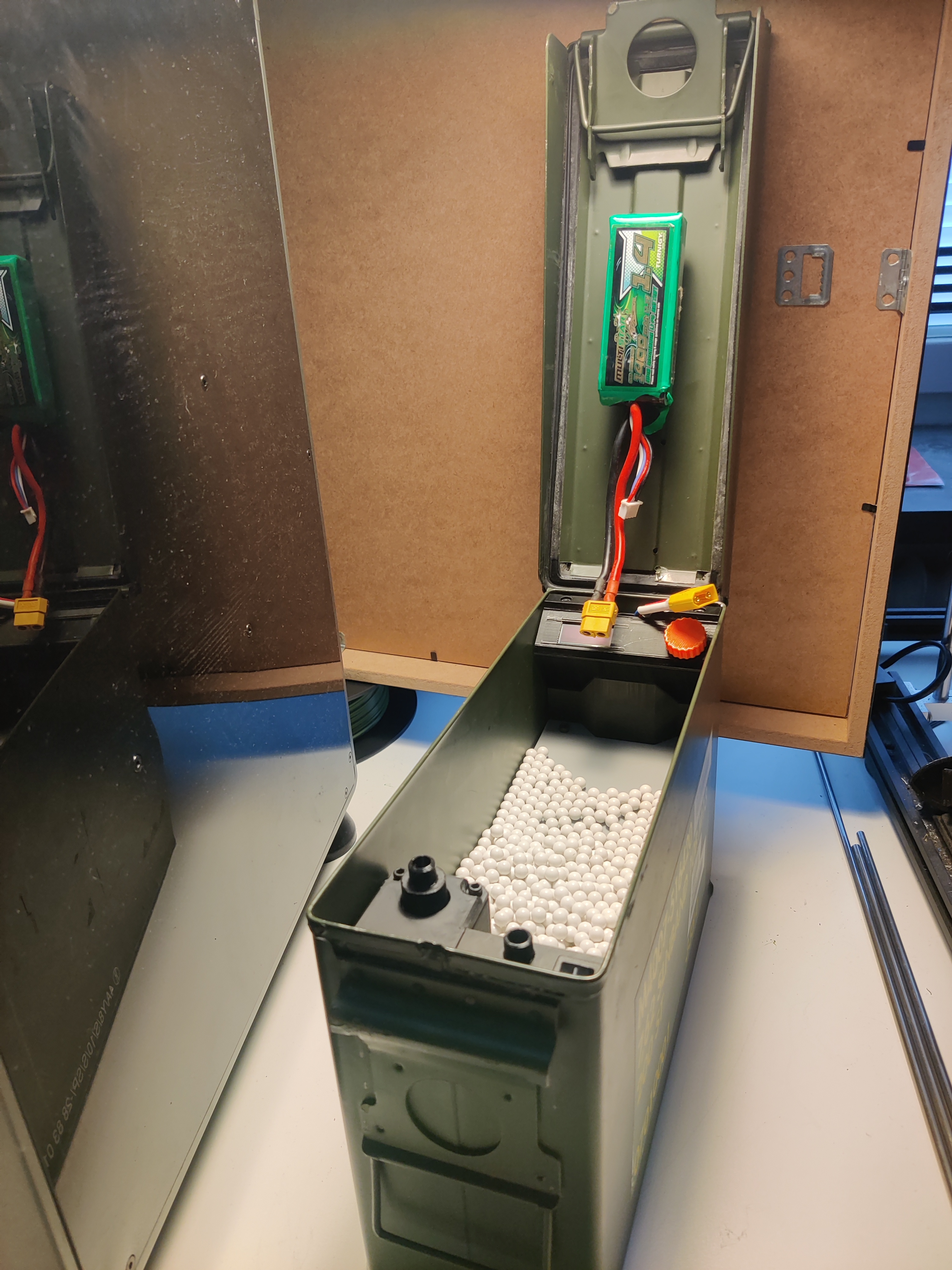
You need something to store it in. I use an old ammo box from a military surplus store.
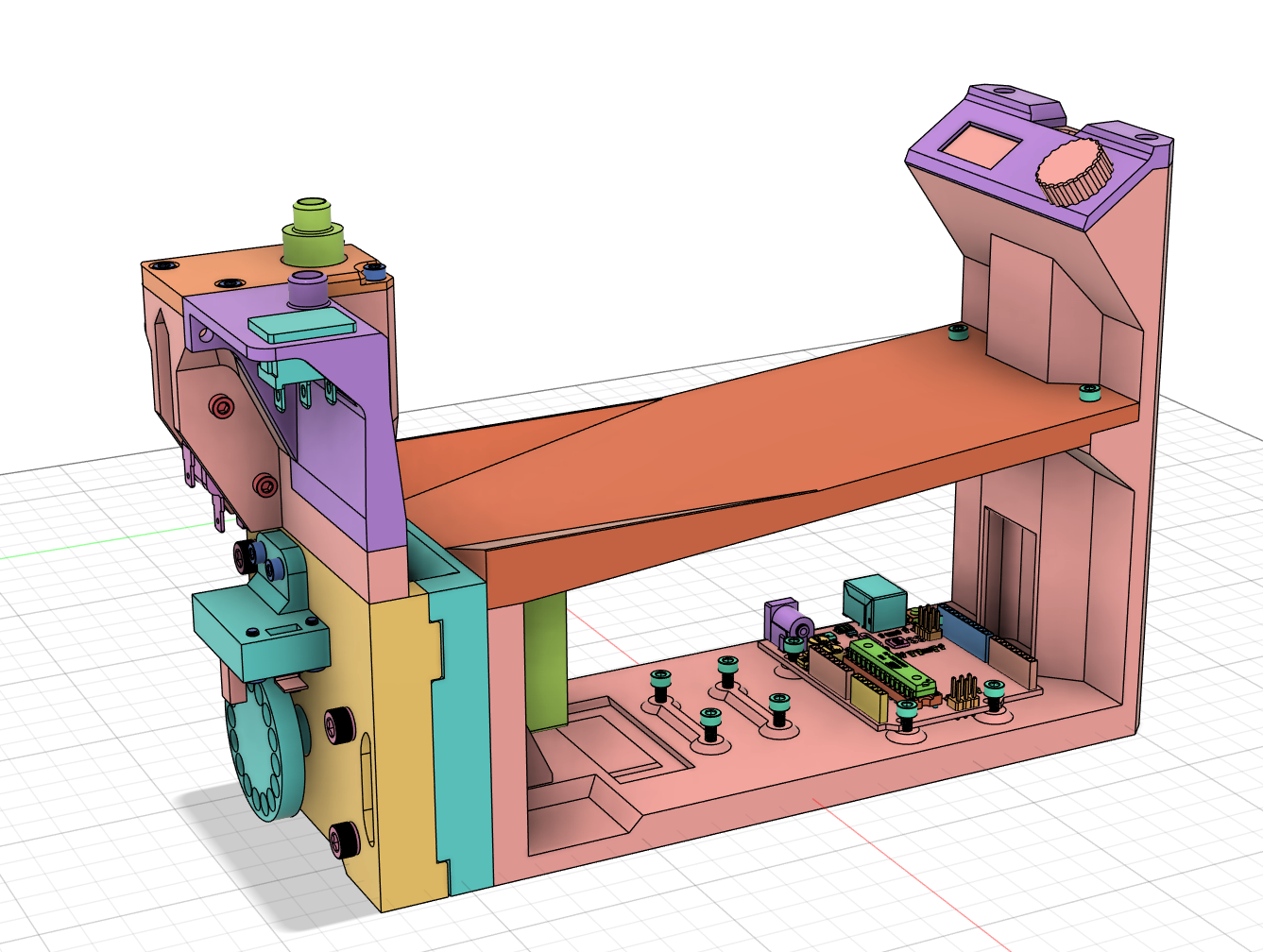
The assembled 3D printed parts has the dimensions of
255mm Long
86.5mm Wide
167mm Tall
So you need a box that can fit that.
The metal box I use has an inner dimension of 256x87x170mm.
And the outer dimension of 280x90x180mm.
7.62
Из-за санкций мы не можем оплатить ваш товар(
I'm ok with that.
всё равно купили, через разные сервисы, ваш товар. Вы большой молодец, у вас есть талант, спасибо вам.)
можешь посоветова, ерез какой сервис можно купить? а то ни напрямую с карты, ни через пэйпал, ни через страйп не выходит... все же РФ
Oplata Guru , Я брал через этот сервис, комиссия 100%
anyone have an idea why i cant choose paypal to pay this file? every other file it works :/
Sorry, i have no idea.
really great, too bad I realized after that there was a V2 xD, it's only for the screen attachment that I don't find great.
For the V2 with the small motor, what gear do you recommend?
I recommend the 16 toothed one. Works great for me, but if you see major wear and tear, go down to about 14. :)
I should probably go ahead and make the v2 the standard now. I've tested it enough to know it works better.
Ok ^^, again a big thank you for your work when I see the final result, as said there is just the fixing of the screen which makes a "stain" with the rest but I understand that it is complicated to find an alternative when I see the composition of this one
Ye the screen isnt the best. I just didnt find a better option at that time. Might do some work on it in the future.
It's me again xD, I used an Arduino Nano while doing V2 and I noticed that your adapter doesn't work, finally I didn't find the right screws to fix it, I have M1.4 that go through and the M2 doesn't go into the Nano, I found an extension card for the Nano that was lying around in a drawer, I didn't look at modeling a support I just stuck it with double-sided tape, maybe interesting to put it in the list of equipment
Could you describe in what way it doesn't work?
If it is the screws. Correct screws should be 1.5m I think. But a piece of tape certainly works too.
There is also a community made file for another solution.
https://cults3d.com/en/3d-model/gadget/arduino-nano-breakout-i-o-panel-mounting-plate-for-bb-loader
Haaa yes indeed I didn't find any M1.5 x)
And I didn't look well for the adapter, a big thank you to you ^^
No problem. :)
Bought it just to say thanks for your work created two minies an they work perfertly. Thanks!
Thank you so much. :)
Hi, do you have a parts list for the upgraded version? I'd like to know the costs before buying the 3D file.
Not at a computer so I can check the list right now.
But
The most expensive parts is the motor and the arduino.
The motor you can see on the basic version parts list.
The arduino is either a Arduino uno, or a arduino nano every.
The other parts are generally pretty cheap.
The loader has been in use. Unfortunately it often blocks and then damages the servo mount (round horn) I order a metallic one now.
I also have to use the strongest feeding wheel (which is also the slowest) otherwise the wheel will constantly be damaged. (All printed in ABS)
Does anyone else have these problems?
I havent heard of the round servo mount being damaged before.
Do you use the 35 or the 60kg motor?
If the 60, it is known to damage the feeding wheel if you run it on too high of a voltage.
It is a really strong motor and wont stop for anything it seems, if run on it's recommended voltage. I recommend a much lower one. I think I put 4.2 volt in the manual. It seems to work for me. So far.
I'm looking into a new design of feeding wheel. But havent had time for it and wont have for atleast a month sadly.
I use a 35kg servo and a 11v lipo from my airsoft gun. I gibt the 4.2 also a try
I havent personally seen the feeding wheel get totally destroyed on 35kg motor. I've had some damage on the A16 feeding wheel, but not too much.
But I just remembered now that I've talked with a guy who also tried ABS on the feeding wheel and it also got damaged really easily. I've personally only used PLA+ and PETG and it have worked well.
Maybe the ABS material isn't good for the feeding wheel.
I made the following changes which led to success:
DC Stepdown to 6.8V
with this i dont have an Issue since 50 Mags
Thanks for the follow up. :)
I'm happy to hear about the success.
Hey i have then same problems my feeding wheel ist constantly breaking :( with 6.8V it is Printed out of PETG @michigixxer what do you meant with “A14 Feeding wheel” ?
Hey, I ordered a stainless steel feeding wheel from craftcloud.
You can upload the file and instantly ordere i at the cheapest factory
no matter what I tried it was always destroyed and jammed
hi. There were difficulties. the loader was assembled according to the scheme and checked several times, but bad luck, when connecting the 11.1v battery, the LED on the arduino lights up very dimly and nothing else happens, BUT when connecting the arduino to the USB, everything works fine, the relay responds as it should, the limit switch is also fine and everything works perfectly, but it's worth disconnecting the USB everything stops working. What could be the problem?
Hi!
sounds like a wire might be a little loose/not good connection. As the 11.1v battery is more powerfull than the usb. It should be no problem for the battery to power the arduino.
Are you powering through a dupont/exeperiment cable into the vin slot? - Might be a little loose.
Also check the -/GND cable, if it is loose it will also not power correctly.
That or the battery might be undercharged, you might have checked it already, but if you havent, make sure the battery is holding a charge and havent broken or such.
the battery is fine, the wires are connected tightly and in a 5.5x2.1mm size on the expansion board for arudino nano
Then im not sure, sorry. Electronics isnt really my area, and I havent had anyone else with your problem. So I havent heard a possible solution to your problem yet. :/
Okay, thanks anyway. I will look for ways to solve this problem:)))
Excellent and now working flawlessly with a Nano. Highly recommend Reading the comments. Also If using a Nano board, High recommend using a breakout expansion board like the one linked here.
Awsome to hear. Will try to add that comment section to the manual.
Thanks for the link. ;) looks like a nice board to use. Will pick one up for sure. :)
Thank you for that neat design, I'm about to print and assemble my first loader within the next few days.
I just got 2 kind of remarks:
- would it be possible to add the used printer settings into the manual, so a reader doesnt have to switch between source files?
- I could offer you a (professional, as in done with propper software) electrical drawing of the wiring, would you be interested?
Good idea, will fix that.
I would like that very much.
So I did create a PDF and TIFF, how can I send them to you?
Awesome, thank you so much. :D
If you have instagram, you could send it to me there. Linked in my bio.
Or if you have a printables account, you could send it to me there. Also linked in bio.
Have to do it this way because Cults dont have private message. :/ And adding a link to something might delay this comment for several days to appear...
Hi,
I built the charger as described in the manual.
This achievement is truly brilliant.
However, I have a significant PB that I cannot resolve.
When the engine is running, the detector flashes correctly at the frequency of the holes in the wheel.
Despite this, the Arduino display does not count the balls correctly, it speeds up at times and adds increments.
As a result, instead of distributing 30 balls, only 20 to 22 come out.
I checked with the oscilloscope at the sensor output and the signals are regular and aligned with the holes in the wheel.
Any idea to solve this problem?
Sorry for the Google translation..
Hi, it could be a bounce issue with the Arduino and the signal. Not sure. I'll try to look over the code and see if I can add something that could help. Will inform you once I have a test version up. Maybe today or tomorrow.
Hey, i've tried but couldnt make it well enough to work. I only ruined my own one and had to go back to original code.
I'm not the best programmer, so not sure what i did wrong.
What i can recommend is check the wiring so nothing is loose. Make sure there is no stringing in the holes of the counting wheel. Because it could be seeing strings sometimes if there are some.
It speeding up says that it either sees something, or a wire is loose somehow and makes it think it lose and then gain vision of something. Like if it is turning off and back on again. I'm not sure what it could be.
Hi,
Thanks for your help.
I found the solution by adding a capacitor between ground and sensor wire.
This has the effect of canceling the bounce and keeping only the high part of the signal.
The count is now correct whatever the motor speed.
Congratulations again for the work accomplished.
Oh nice. Well done. Could you describe in more detail what you did? In case someone else gets the same problem.
Also interested in the capacitor added. value etc maybe a link and a photo.
Adding 0.1 µF (104) ceramic capacitor from the signal pin to ground should slove this problem
Hi,
I added a capacity of 100uF/25v between the ground and D2 (the - of the capacity on the gnd and the + on D2).
This has the effect of reducing the rebound effect and making counting more reliable.
I can confirm that adding a capacitor to vin and ground at the nano stabilized the operation and the nano no longer resets randomly. Also I placed a capacitor in the pick up fork as advised above. I would recommend this. as I'm not very knowledgeable on electronic components and followed advice here. It would probably be best to follow the advice in these comments or research the correct values.
can any send me a diagram of how they did the capicator. also my countdown starts but never counts down any advice would be grateful. leonsimp1990@gmail.com
have you checked that the pickup fork is flashing when the ring rotates inside the fork ?
don't see any flashing will check cables over just incase
I noticed some strange behavior with the ball counting. After reading the comments, I realized that I'm not the only one. The problem does not necessarily need to be solved by adding a capacitor between the ground and the sensor wire. Since the sensor wire runs close to the engine, it gets interference. I recommend making a twisted pair of wires or braiding them separately, this way you can minimize interference on the signal wires. You can also use shielded wiring for more accurate operation of all components.
Sorry for my Google translator )
Thanks for the tip!
Had no idea, will try if i get the problem my self.
hi,
can someone provide the updated electrical diagrama? it does not work , thank you.
Hi, could you describe what does not work and in what way?
To my knowldge there isnt a updated electrical diagram.
Hi! It finally worked. I found a poorly conected cable… thank you so much
Ah ok, that happens. :) Happy to hear it started.
Hi,
I just finished soldering, need to make some cable management and kind of damper things, so the minimal space between the ammo box and this thing is filled (I used some czech size 1 box, should be same size as all size 1 boxes are 200 rounds 7.62, but anyway).
I had an idea for loading, is it possible to add the loading time of the actual process at the screen? I am not sure if that fits next to the BB count,
but may be possible to show at the end of loading, e.g. showing up the BB count in live, like it is now, but after finished the load it could wait for 3 sec, show something like "BBs: 140", wait for 3 sec and then cycle the screen to "9.3 sec" after that.
I would try doing that, but have to come into the script language for that.
Other than that, really nice model. I build a second one right now. Lets see how good it will perform, as it will be used end of month for a week-long event in germany!
Hope there the improvements will continue, keep up the nice work!
Best regards
That is a fantastic idea. I'll see what i can do about the time function.
Good luck on the week long event. Would love to hear how the performance was during that week.
Thank you for the idea. :D
Hi there, I’ve built the loader, one thing is when I turn it on. The motor is constantly running I have gone over the wiring diagram and all seems right. All the outputs and inputs are in accordance with the diagrams. It appears I’m getting a supply to the relay signal from the arduino. The loader activation and program appears to be working fine. Any ideas ? Thanks, maybe try another arduino
Hi,
There could be several different causes.
But, i would think it might be the micro switch that you have set up wrong. It has three pins. One "com" that one is incoming. Then we have the two outgoing pins, NC and NO. If you have your wires on COM and NC it will send a signal the whole time while not being pressed. It should then stop if you press down and the micro switch is pressed.
The correct way is Com and NO. But if you already have it like this. Check so the micro switch isnt being pressed in constantly.
If nothing of those, check the relay. It also has a NO and NC port. You want the one going to the motor on NO.
If the relay is getting a signal to switch constantly, you need to check your wiring again. It should only get a signal while the micro switch is being pressed.
Thanks for the fast reply. I just checked and the micro switch is in the correct position and wiring. If i Press the micro switch it stops the motor and it starts to display the bb count until it slows down to a stop. it is an old nano so maybe worth trying a new one.
Ok, as it does start counting, you definietly have the micro switch in the right ordfer.
Check the relay module then. I dont think you need a new arduino.
It is wired the same way. The middle one, usually, is COM, and then one side is NC and one side is NO. So try changing how you have it wired in the relay module. As the NO, normally open, is the one you want the wire in, that goes to the DC-DC step down module.
Once the relay module gets a signal, it changes the connection of COM from NC to NO. And it seems your does that. But you have the wire to the motor, in the NC port.
You are a legend. Fitting output to the DC to DC via NC has solved the issue I Had. I was thinking it needed the signal to start up and work whilst holding the switch down. So that part works now. I do get run on in free mode and sometimes it glitches out but i feel that is my hardware. Thank you for supporting me, and your design. When im done I will add it to here. Cant wait to see what you make next.
Great to hear you got it working. :)
Dont hesitate to ask more if you need help with anything specific.
Hello, I made the speedloader, it's great! Thank you for the work you do. I was wondering if you were planning on making an adapter to load the pistol magazine?
Thank you so much :)
Yes I'm planning on making an adapter. But I'm not sure when I'll be done. Still in rough stage.
What orientation did you print the main body ?
On it's side. I think I uploaded them all in the orientations I printed them in, but i guess it could differ from printer to printer.
You can print it standing up as well. But i dont think it would be as strong then.
cool, have it printing now :-)
Can you upgrade design to fit nema motors? Why u didn't go with Nema motor?
I tried using a NEMA motor originally about 2 years ago. It was not strong enough. I might have done something wrong I don't know, but could never get it to work.
Tried three different ones.
¿Te gustan Cults y quieres ayudarnos a continuar la aventura de forma independiente? Tenga en cuenta que somos un equipo pequeño de 4 personas, por lo que es muy sencillo apoyarnos para mantener la actividad y crear futuros desarrollos. Aquí hay 3 soluciones accesibles para todos:
Compartir y descargar en Cults3D garantiza que los diseños permanezcan en manos de la comunidad de creadores. Y no en las de los gigantes de la impresión 3D o del software que poseen las plataformas competidoras y que explotan los diseños para sus propios intereses comerciales.
Cults3D es un sitio independiente y autofinanciado que no rinde cuentas a ningún inversor o marca. Casi todos los ingresos del sitio se devuelven a los creadores de la plataforma*. El contenido publicado en el sitio sirve *únicamente a los intereses de sus autores** y no a los de las marcas de impresoras 3D que también desean controlar el mercado del modelismo 3D.
What I'm doing wrong, all the time gear is coming loose from motor