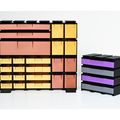


Hi,
thanks for the reply, I'll wait until it's available.
- 1 curtida
👋 Olá, pessoal! Este tópico é público, então vamos mantê-lo agradável e respeitoso. Nada de anúncios, spam, nem nada desagradável!
🇬🇧 País do usuário: Reino Unido
🌐 Idioma preferido do membro: Inglês. Você pode traduzir online usando o DeepL.
💡 Está se referindo a um modelo específico? Adicione o link, título ou número do modelo.
🖼️ Quer publicar fotos? Use um host gratuito como ImgBB e cole os links na mensagem.
✍️ Dicas de redação: Use o formato Markdown para estruturar seus textos e torná-los mais legíveis.
Hi,
thanks for the reply, I'll wait until it's available.
No worries. Hopefully won't be too long.
Hi, thanks for the reply, I'll wait until it's available.
The drawers are solid. I can't use these. I'm going to need a refunt here.
Hi. It sounds like you don't have 'vase mode' activated in the slicer. Activating this will make the models print as expected. If you need any assistance, please message me.
I don't have that capability and need a refund. Model should work as-is.
To be fair, the model does work as advertised, as it states clearly on the listing that it is designed to print using vase mode. Can you confirm which slicer you are using please?
I've escalated to support, thanks anyway. I don't have the time to troubleshoot this and it's not clear per your listing, I disagree.
Ok, thank you for the update.
For clarity, the listing states 'vase mode' both in the title and several times in the description, and there is no troubleshooting required to print the model, only a simple slicer setting as per the detailed instructions provided in the listing. The design has been downloaded by over 700 people and printed without issue.
I am always happy to help those new to 3D printing, which you appear to be and, as such, I was offering my assistance. I am also happy to provide a refund if you do not wish to print the model. This has now been processed, please delete the files you have already downloaded as you are no longer permitted to use them
Cults is a friendly and supportive platform for both designer’s and makers, and there really is no need for such a confrontational approach.
Not being confrontational - just short, as ive stated I dont have any time. I am in a rush. This product has set me back in timeline and if you cant refund me, ill just escalate because, again, time.
It appears that you also didn't have time to read my previous message which said the refund has already been provided. You must be very busy indeed :-D
No, I didnt have time to read a novel. Thank you for the refund.
Hello, are the drawer systems also available with labeling fields?
Hi. The original drawer system does not, but the 'Trapezoid Edition' does include optional label holders. I have been looking into adding these as an option to the original system but I am still working on it currently.
Hey LR3DUK! I just bought your shelves the other day and was wondering if you have a 150mm version with/without tabs? Cheers!
https://cults3d.com/en/3d-model/home/fast-print-modular-desktop-shelves
Hello, sorry when I bought this item on the third of this month, I went to buy something else for a similar price and didn’t realize that cults didn’t take the item out of my cart for some reason and I bought it twice on accident. The item looks great and printed great for the sandbags, but I didn’t mean to buy it twice if I could get a refund please. if I could’ve sent this privately I would have, but I can’t figure out how to do that
Hi. I can't find any sales under your username. Did you download the models using another account, or perhaps from another seller?
I have a question. My elegoo centauri has the vase mode. My question is can i use my .4 nozzle or do i have to the larger one?
I have been in resin 3d printing for years. Im just now leatning fdm (if thats what its called with the filament). Thanks
Hi. I'm not very familiar with the elegoo centauri specifically, but most FDM printers can print at a significantly wider line width than the nozzle diameter. I use a 0.4mm nozzle with my creality and bambu printers to print at 0.8mm line width for vase mode models and have had no issues. The print speed just needs to be reduced so as not to exceed the maximum flow rate. If you have one available, a 0.6mm or 0.8mm would be ideal though.
Ok thanks. I have purchased the file.
Hi @LR3DUK, I see that someone has an almost identical design posted here: https://makerworld.com/en/models/105496-stackable-storage-bin-spiralized-vase-mode#profileId-112595
Thanks. I have already reported this one. Makerworld/Bambulab don't seem too interested in doing anything about it though :-/
Having an issue with this print its completely solid- no hole or anything just completely solid. Im sure its user error but can anyone help
Hi.It sounds like 'vase mode' is not activated in the slicer. Depending on the slicer you are using, the settting is usually named 'spiral vase', 'spiralize outer contour' or similar.
For optimal strength, a line width of 0.8mm is also best.
I’m using the anycubic slicer
I'm not very familiar with anycubic slicer, but from looking online I believe the setting for vase mode is 'spiralize outer contour' .
📊 Creator Tools – Open Beta Invitation
Hi LR3DUK!
I’m reaching out to invite you to try CultStats — a tool I’ve been building to help Cults3D creators get deeper insights into their sales, revenue, and trending designs.
You might wonder if it’s safe to use — and I completely understand.
CultsStats has earned the trust of Cults3D through long-term cooperation, and is now officially listed on their API page as a trusted integration.
Once set-up, CultStats will automatically sync your sale-data securely in the background and provide you with weekly sales reports, trending designs and way more than I can explain in such a short message.
If you’re open to exploring it and possibly sharing feedback, I’d love to have you on board. The beta is free and live now:
Thanks for your time,
– Angev
Hi,
I just saw your downloads and makes and I'm sure you'll love my latest flexi design, flexi articulated wild robot fidget toy which is on sale right now:
https://cults3d.com/en/3d-model/art/the-wild-robot-flexi-articulated-fidget-toy-print-in-place-no-support-m3
I have a collection of different designs, from phone stands and pen holders to chibi funko pop figures and even keychains.
You can also check my other designs here:
https://cults3d.com/en/users/M3DCURY/3d-models
Good luck
Hi,
I purchased your file for the stackingbin, if I open them in creality. The bins don’t have a opening.
Did I do something wrong or did I miss something?
I hope you can help me!
With kind of regards,
Joëll Tax
Hi. It sounds like Vase Mode may not be activated in the slicer. In Cura based slicers, the setting is named 'Spiralize outer contour". This model also prints best with a 0.8mm line width. I hope this helps.. if you need any further assistance, just ask :-)
Hi! It's me again! :-) I'm looking at printing the FAST-PRINT Trading Card / TCG Storage Boxes. My son interested to have them without the inside tab separators of the box. Is it possible to get a box without those?
Hi. The separators serve a few purposes; to provide separate compartments for sorting, to ensure cards stay upright if boxes aren't full, and, most importantly, they stop the print from warping during printing. Warping can especially be an issue for single-walled models with large open faces, so removing the separators would likely result in print issues. I hope this makes sense. :-)
Hello! I am working to print your FAST-PRINT Trading Card Sorting Trays. However, in vase mode, there is not a top layer that prints. Is that the design that it's open on the back? I'm confused how this works. Thanks for any tips.
Hi. Thanks for downloading my design. The open top is normal when using vase-mode and will not affect functionality. The model can also be printed in non-vase mode if preferred, which would add top layers (and infill), however, print times would be significantly increased.
Thank you for the quick reply! Ok. I’ll give it a try. Yeah, non-vase mode was 12+ hrs!
This is not working for me. All of the files in this are SOLID blocks with no inlets for the drawers. They are basically solid cubes. What's going on here? https://meat-mattress.imgbb.com
Hi. It looks like 'vase mode' isn't activated in the slicer. Deoending on the slicer, the setting is usually called either 'spiral vase' or 'spiralize outer contour,. For optimal strength, a line width of 0.8mm is also best.
That makes so much sense now! Thank you
No worries. Let me know if you need anything else :-)
hello, I am interested in buying some designs, can I sell the prints?
Can it be printed using Anycubic M7 Pro?
Thank You
Hi. I'm not currently offering a commercial licesnse, but I'm looking into this so may be at some point.
Most of my models are designed for 'vase mode' so primarily for FDM printers, however it should be possible to print them on a resin printer with the right settings.
Just bought the model. I'm a bit confused as you say to choose a 0.32mm layer height but Orca Slicer warns me its too big. Do I have to change to a 0.6 nozzle for your recommendations?
Hi. A larger nozzle would be optimal, but I use a 0.4mm for all my models (at 0.8mm line width and 0.32mm layer height) and have never had an issue with this.
I'm not very familiar with Orcaslicer, but it sounds like it may be complaining if the line/extrusion width hasn't been increased to 0.8mm, as 0.32mm would be too high at standard line width.
P.s. Thanks for downloading the model :-)
Thanks for the answer. I'm still kinda new to this, so sorry for the questions x). Here is a screenshot of the Quality Settings in Orca Slicer (https://ibb.co/fSYD2QZ). If I understand correctly I would enter 0.32mm for Layer height, but what about first layer height? Also the "Default" line width would be set to 0.8mm, what about the other input fields? Also you recommend a speed of 25-30mm which seems pretty slow for me, since the default is set to 200mm/s(outer) and 300mm/s (inner). Maybe you can help me with that so I can print the first piece :D
Hi. No worries for the questions.. I'm always happy to help.
The first layer height won't make much difference, but 0.32mm should be fine. I normally change all of the line width fields to 0.8mm to be sure.
When the modular drawer system was first lauched, high speed 3D printers were quite rare and people typically printed at around 50-60mm/s, but I recommended 30-35mm/s so as not to exceed the maximum volumetric flow rate of the printer (how much filament the hot end can reliably melt) at the increased line width. Over the past couple of years, the high speed printers that have been released have a higher maximum flow rate (typically 30mm3/s as opposed to the 10-12mm3/s of older printers) , so they should be able to print my vase-mode models significantly faster. Cooling is also a factor though, so each printer will be different.
Some slicers will now automatically throttle the print speed so as not to exceed the maximum flow rate set in the filament settings, so you don't need to worry too much about setting a specific print speed. BambuLab does (which I tend to use), so I suspect Orcaslicer does too as they are similar.
I hope this makes sense. Sorry for the long reply but, like a lit of things in 3D printing, it can be difficult to give a simple answer because of all the different possible factors and printer types. It does keeps things interesting though :-)
If you have any more questions, feel free to ask.
Alright, thank you very much! Just printed the 40mm Frame and a 38mm Drawer and it worked perfect. For anyone else seeing this, I set the Layer height to 0.28 (recommended max for 0.4 nozzle) and Line Width Default to 0.8 (enter 0 in all other Line width fields to apply the default there aswell). I didn't even change the bottom layers but it feels already strong enough for me (atleast for the small one).
Is there a way to join stacked drawers? The connection is pretty loose, meaning they just fall apart without any grip.
Hi. The fit should be tight enough to hold the frames together securely, especially when joining multiple frames into a large unit. If it feels too loose, there may be some under-extrusion affecting tolerances, so it would be worth checking the wall thickness is 0.8mm if you have calipers. A quick fix for a tighter fit would be to set xy compensation in the slicer to a slightly positive value (eg 0.1mm). Otherwise a spot of glue should do the trick.
Hello here are my pictures
https://ibb.co/YPHtrw1
https://ibb.co/WGCm963
https://ibb.co/qC1FwFN
I managed to do it, I reduced the speed again, now it works. Thank you for your effort
Thanks for the update.. I'm glad you got it working. From the photos it looks like it could have been either a cooling or under-extrusion issue. Slowing down the print could help with either, so this makes sense either way.
Hi, as I am mainly using printables and found your old design there, I wonder if you also could upload this one to printables too. There is a store option there, so paying for it would not be an issue ;)
I also wanted to know if I can use the drawers from the "older" system which are on printables, as I printed some of them to test the design as there is no option for the payed version to see and test it with at least a single drawer without paying upfront.
Thanks
Hi. Thanks for your interest in the models.
The older version of the modular drawer system on printables is fully compatible with the newer version on Cults3D, with the small exception that the old-type frames can't be placed below the newer frames. This is because the frames in the new version have an additional 'foot'.
At present, my paid models are only available on cults3D but may be on other platforms at some point in the future.
If you have any more questions, please feel free to ask :-)
Well I do ;) made some test prints with the freely available ones on printables :) quite nice. With the payed version, you have quite some variety on the drawers, and some variety on the frames from a width perspective.
But what I am missing actually is a frame with the standard width (and depth) but just being half the height of the 11,1cm frame height. Is this something you would consider adding?
This would allow me to better fill the last gaps with my shelves :)
Which version are you requesting the shorter frames for? I wouldn't be able to add them to the main listing as I need to ensure compatibility between all frame types and the central runner/joiner profile is a key part of this. I may be able to modify a frame as a one-off though.
I would like to have a different height, actually just have the height. This should still make them compatible to the rest. So if you take two half height frames, they should be the same height than the normal one with 11.1cm
I tried to cut one by myself and worked out just fine for now. So normal height and half the height and we are all fine I would say. I see no issue why this should be a problem with "compatibility", but it is your design not mine ;) so you most properly know better.
I also want to add, that a Top Face with the width of 120mm would be great too, as this would allow to clip any combination of frames in a way that every frame can be connected with another new frame which would make it more steardy and helps the joiners to better support the whole system.
the 80 and 40 mm version cannot be combined in a way to bridge ever gap/combination of frames on the top :) to gain more stable joines.
Thanks :)
These should help: https://cults3d.com/en/3d-model/home/120mm-160mm-flat-top-for-fast-print-modular-drawer-system-c91c3a1dd19b37773e27
Ah perfect, my fault, as I did not look any further than into the ZIP file 😀 Thanks
Hello whenever I open these files in cura/orca or creality slicer, both ends of the frames are closed. Am I doing something wrong?
Huh, this is new to me, so for anyone else who were tricked by the same issue, when you slice it, the top goes away, but not until you actually slice it.
Hello, Which flat top at 160 mm? Can't find anything, 80 mm with a middle bar doesn't fit, would have to be without, then 2 80 mm would fit.
Question, When I print drawers, they print hollow solid. Like the 158mm single-height drawers. What am i doing wrong? https://ibb.co/TM05Hqs
Hi. Vase mode needs to be activated. The name for this setting varies between slicers, for example in Cura it is 'Spiralize outer contour' and in PrusaSlicer it's 'Spiral Vase'.
For best results, line width should also be set to 0.8mm.
Please let me know if you need any further assistance :-)
Do you also have a version of the drawer/shelves that are more heavy duty but offer the same aesthetic?
Hi. I have three drawer systems available, but they are all designed to be printed in vase mode. However, they can be printed in non-vase mode with multiple walls (eg. 3 x 0.4mm) to increase strength by setting the infill and top layers to zero. If doing so, the drawers need to be printed slightly thicker to allow for the increased wall thickness in the frames.
Hi just wondering how i can print those extra long shelves the second last one from this design https://cults3d.com/en/3d-model/home/fast-print-modular-desktop-shelves
Hi. The longer/wider shelves are the STL files named 'double'. There are different versions available with or without tabs. I hope this helps. If you need any further assistance, just ask :-)











ok