


Hi can I ask how did u mount the flight controller bcs my screws are too small did u use anything other and what ?
- 0 curtidas
👋 Olá, pessoal! Este tópico é público, então vamos mantê-lo agradável e respeitoso. Nada de anúncios, spam, nem nada desagradável!
🇫🇷 País do usuário: França
🌐 Idioma preferido do membro: Francês. Você pode traduzir online usando o DeepL.
💡 Está se referindo a um modelo específico? Adicione o link, título ou número do modelo.
🖼️ Quer publicar fotos? Use um host gratuito como ImgBB e cole os links na mensagem.
✍️ Dicas de redação: Use o formato Markdown para estruturar seus textos e torná-los mais legíveis.
Hi can I ask how did u mount the flight controller bcs my screws are too small did u use anything other and what ?
Are you using the screws from the drone ? Normally I adjusted the holes size to correspond to them, so normally no glue is needed.
Hi, I just downloaded the STL for Paul's knife, but the size is too small, the slicer scale it up by a 500,000% and it losses texture, is there any way for you to email me the file in the right proportions?
Yes, can you give me your email adress ? Just to know, which slicer do you use ?
Sure, it's: lg.escalante.1911@gmail.com
Currently I'm using Chitubox Basic, its been a while since I printed resin, but for this model I don't see a better way.
Hi! I printed your cinewhoop style drone frame for the cetus and it got up a CM and the dropped and i was wondering how you got it to fly.
I wired the motors like you did and even swapped rhe props around and still nothing
If you wired the motors and swapped the props as shown on the main picture on the model's page you shouldn't have any issue. I don't have the drone with me right now to take new pictures and add annotations. Let me know if you manage to make it fly, else the best I can do for now is a refund. Just keep me informed of your progress and your decision.
Hey i am currently making your inline 4 but the tiny cam and camshaft seem to bother me can you possibly make an aditional file that has a full cam shaft with all cams please, THANK YOU!
Hey, I added the file you asked for. Let me know if you need further help.
Thank you so much for that i dont need any more help
hey I want to ask something else for your inline 4 Would it be possible to make the crankshaft all in one as another model, THANK YOU
I added the file you asked for under the name "Inline4 - crankshaft.stl", but I really recommend to use the original files ("crankshaft 1", "crankshaft 2", "crankshaft connexion") because you will need to use supports to print it in one part and this could increase friction and lead to poor performances. Anyways, when you manage to run it, could you please add a make to the model's page ? This would help me understand how the community handles my designs. Thank you. Let me know if you need further help.
Yes of course no problem see im using an ender 3 pro to print stuff and it dosent like to print to fine
I might need some help on the supports for the cylinder it keeps putting them where the pushrod is
Maybe you can try to print this part upside-down (the smaller side facing the build plate). You can also go to this video : https://www.youtube.com/watch?v=BHVNMhmqqU0&t=11s at 4:02 I quickly explain where to sand the pushrod housing. Don't forget to carefully sand the pistons and the inside of the cylinder.
so i printed it upside down and it works great im almost done 3d printing everything i need this crank to stop breaking and all i need is the sidecaps after this crank how would you set the timing for this engine though?
my crankshaft keeps snapping in half
Yes. My bad, I forgot to add the gear timing. I added a picture on the model’s page showing the correct timing.
Did you use the crankshaft in one part ? Or in 3 parts ? Maybe you should try to increase the number of walls and the infill percentage.
i tried 100% infill 2 walls my printer isnt percise so ive been using the one peace
its fine i just made it all walls with a new nozzle and it worked good but i have timing everything correct it is really smooth just dosent want to start im printing the propeller now for it
Hey i posted the make i have yet to make it run but i wanted to give you a heads up the timing seemed a little bit off to me you probaly have it timed corectly but for me it was off
My only advice here is that you try to tune a little bit the timing. Also, did you make sure that all the pushrods can slide without any friction into their respective housings ? If one of them struggles to move (especially down), maybe you can try to sand it a little bit more, or you can also try to print the flywheel to smoothen the rotation of the engine. One trick I made to reach better performances is to dip the engine into water before running, this helps with lubrication and sealing. Normally the engine should run fine between 3-5 bar of air pressure.
Ok thank you
SHE RUNS LIKE A BEUT AND I GUESS YOUR TIMING IS CORRECT LOL i will post a video soon with it
Could i possibly make a request for a scaled down 3.0l v6 engine i want to have a mini working engine that sounds like my 4runner
Right now I'm a little bit busy with other projects but I'll do it for sure in the future. I'll let you know when I'll be working on this. For now maybe you can try to print the V4 air engine, it's rather easy to build : no additionnal hardware is required.
Hello, I've been trying to download the V8 engine but it says "interrupted: Network Error". I use ethernet and it runs perfectly, I don't know why it keeps saying the same thing every time I try to download it. I remember to download your previous designs and it worked fine, except this one. Please give me solutions for this issue.
Hey ! Yes I recieved a notification from cults3D saying that they had some issue with the servers, the only advice I can give you is to wait for them to fix the issue. Regarding the V8 compressed air engine, I printed it using PETG but I dont recommend this material because there is too much friction and it fails to run smoothly. I will print it using PLA and give an update on the model's page.
Thanks for the help. And, by curiosity, with what settings do you recommend me to print it? Do I need something more to reduce friction? How can I resize it a little bit bigger? (Sorry if there's many questions, I'm new with 3D printing).
You're welcome. I uploaded new files, I recommend that you print "set 1" with supports and "set 2" without. For the layer height, I recommend 0.1mm and for the material I recommend PLA. A technique I found to reduce friction is to put some table salt inside it and crank it by hand : it will wear the parts until they fit together without friction, then you just have to rince it without disassembling it. Moreover the water helps lubricating and tighten the gaps to prevent air leaks. If you want to resize it I would advise you to directly look at a tutorial for the slicing software you are using. I hope this has been helpfull for you.
Thanks for the help.
Bonjour, j'ai acheté votre lanceur d'appâts et je dois dire qu'il est très bien conçu.
Ceci étant dit, je me demandais si je pouvais avoir les fichiers cad. Je voudrais ajuster certaines choses comme la longueur de la poignée et d'autres choses. Je vous remercie de votre aide et je vous souhaite un bon travail mon ami :) mon email est johnnysavoie33@gmail.com
Salut j'ai un probleme pour imprimer le moteur a air comprimmer car quand je met les modelle sur cura les dimmension sont aléatoire
Bonjour, j'utilise aussi Cura et le message suivant s'affiche quand j'ouvre le fichier STL : "Auto scaled model to 100000% of original size". Je suggère que tu essaies d'augmenter la taille du modèle par un facteur 100000%. Je pense que ça devrait marcher.
hi it me Agen im missing a part the top frame i have one but not the other
Yeah, so I’m missing the right panel for the thing and I’m using the shotgun mod to it but I can’t find the other side panel for the frame. I don’t know if you can help me because I can’t add a photo so you probably don’t know what I’m talking about But in the in the folder or file or whatever it’s called it’s called the top frame and I need the right one. I have the left. I need the right.
I see what your issue is. The part is exactly the same as "top frame.stl" but mirrored. Just mirror the part in your slicer and that should work.
ty i got it to mirrore
what is the fps
The fps ?
He means the feet per second
I’m thinking about buying that airsoft gun. I have one question though because my friend bought it and he printed it and we can’t get it to shoot like in the videos. Do we need the O-rings or does he technically need the O-rings?
Because right now he’s using a piece of tape to stop the air or like to make it airtight or whatever
Ok my bad. I don't own a chrono so I can't tell. For the o-ring, the blaster won't work without. If you look at the part "air circuit.stl" you will see that there is a groove in the front to put it in. There is also another location for a bigger o-ring on the piston but it works without (i don't use one). If you really can't find the o-rings (1.9x4.9x8.7mm o-ring (n°4 o-ring)) in your local hardware store, I suggest you try to fill the groove (on "air circuit.stl") with something (paste, hot glue...) and sand it to add a nice surface finish. Then, if you can't get it to shoot, I suggest you try to sand the inside of the barrel or reprint it with a thinner layer height for the BB to slide. If that doesn't work and your freind bought it less than 30 days ago, he can still ask for a refund.
Ok I will try the hot glue thank you
Hi me and my friend can’t get it to shot it ceps rolling out of the barrel
We tried hot glow
Hi so I just bought your airsoft gun that you designed I can’t print it cause I can’t find it on the slicing website. It’s way too small. Can I perhaps have the measurements or the files that are correct so I can print it because it is microscopic and my printer won’t allow me to print it because of how small it is so if you could help me much appreciated
i need the fills or I'm reputing for scamming
Hello, which slicer are you using ? Try to scale the model by 100000% (yes, that exact percentage). I usually use Ultimaker Cura and I sometimes get the following message : "Auto scaled model to 100000% of original size". Other people don't seem to have any issue with the files. If your slicer won't allow scaling, the best I can do is to refund you. I hope this solves the issue. Let me know if you need further help. Best regards.
hi ya im using flash forge
what one do you use
I use Ultimaker Cura
ok
how do i set it up for a adventurer 5m
In the settings
ok
ty im danloding it
can u hop on a goole met to help me
I'm sorry, I can't do that. You can find tutorials to configure Cura on the internet.
Hi so I just bought your airsoft gun that you designed I can’t print it cause I can’t find it on the slicing website. It’s way too small. Can I perhaps have the measurements or the files that are correct so I can print it because it is microscopic and my printer won’t allow me to print it because of how small it is so if you could help me much appreciated
Hello, which slicer are you using ? Try to scale the model by 100000% (yes, that exact percentage). I usually use Ultimaker Cura and I sometimes get the following message : "Auto scaled model to 100000% of original size". I hope this solves the issue. Let me know if you need further help.
hi bro, i recently purchased the cetus lite beta fpv 3d model from your page after assembling everything i am not able to get it to fly can you help me a little please about how to wire the motors and the propelers ?
Hello, regarding the wiring, I recommend that you connect the blue and red motors to the front right and rear left locations. Connect the black and white motors to the front left and rear right locations. Install the CCW propellers on the blue and red motors and the CW propellers on the black and white motors. Let me know if you need further help.
The engine project purchased from you is an empty zip file. THX
Hello,
Are you talking about the 9 cylinders radial engine ? The files seem correct. Have you tried downloading it again ? Let me know if you need further help.
Hi! I downloaded the files for the 4-cylinder pneumatic engine. The files are not compatible with CHITUBOX or other resin printing applications.
Hello, I only made STL files for this model. Moreover, I don't own a resin 3D printer, so I don't know if it works with it. If you own a FDM printer the model is perfectly fine to print. If you don't own one please tell me if you want a refund.
on cura it scales it all wonk so how do you fix that and what's the scaling
I made a post on YouTube (link on the model page in the print settings section) that explain what to do if you’re using cura. Feel free to ask if you have other questions
ok thanks
on cura it scales it all wonk so how do you fix that and what's the scaling
OK, j'avais pas vue que tu préferrais le francais, je viens du quebec. Le trou interne pour le support n'est pas constant tous le long des 7 pieces. Les pieces 1 et 2 ne sont pas alignés avec les pièces 3, 4 et 5. Et le trou entre 5 et 6 n'est pas aligné non plus. Aussi, il n'y a pas de trou interne entre 6 et 7. Et le trou de support dans la pieces 1 et 6 n'est que 2 cm de profondeurs, ce qui n'est pas très fort. Donc, idéalement, il faut réaligner le trou interne entre toutes les pieces. Dans un monde idéal, le trou dans la piece 1 pourais aller plus loin dans la pices pour plus de forcer et le trou devrais continer de la pièces 6 a la piece 7 pour donner du support au manche. Si le trou est trop gros pour les deux pièces du manche, un plus petit trou pourais etre mis entre 6 et 7 pour donner plus de force aun manche. Merci a l'avance !
for 1945823
Bonjour, je serai très occupé durant les 4 prochaines semaines et je n’aurais donc pas le temps de corriger le modèle 3D avant le début du mois d’août. Est-ce que vous souhaitez un remboursement ?
SVP, merci !
There is a lot or problem with the suppport hole for the sardaukar blade. The hole from part 1 and 2 are not fitting with part 3, 4 and 5. And the hole from part 6 is not alignied with part 5. Also, theire is no support between part 6 and 7 and i think it shoulsd have one. Also, support hole in opart 1 and 6 are only 2 cm deep and this is not enough fro stenght.
for 1945823
Hello good morning how can l print or where can l find the piston file for the "PNEUMATIC PISTON MOTOR" there are only 10 files and l would be missing that one.
Thank you for your feedback, I added the file directly on the page where you found the other files. Feel free to ask if you have any other question.
I can't find it, can you tell me where l can see it or pass me the file, thank you vero much.
Can you see all files when you click on "download" on the following page : https://cults3d.com/fr/mod%C3%A8le-3d/gadget/piston-air-engine Let me know if this solved your problem.
Yes, i think so, i alrededor hace 11 files. Thank you very much.
Hi, I purchased your drone stl, but when I open it in Cura for slicing, it automatically resizes to 100000%, and if I don’t resize, it’s far too small to even see. Do you have suggestions for how to open and correct the size for slicing and printing?
en Francais: Bonjour, j'ai acheté votre stl de drone, mais lorsque je l'ouvre dans Cura pour le découper, il est automatiquement redimensionné à 100000%, et si je ne le redimensionne pas, il est beaucoup trop petit pour être vu. Avez-vous des suggestions sur la façon d'ouvrir et de corriger la taille pour le découpage et l'impression ?
Thank you for your feedback. I see what your problem is, I had the same message while opening the files in Cura. Don’t worry, some versions of Cura might resize the model by a factor 10 (exactly 10). If this is the case, the model won’t fit on a standard build plate. Just divide its size by 10 (delete one 0 in the scale panel) and it should be good. If the dimensions of the model already seem to be right, don’t touch them. I made a post on my YouTube Channel (https://youtube.com/@hls_designs?si=1mJZDsTkWvMRhhnN) with pictures of the models in Cura that are at the right size to help you. Let me know if this solved your issue.
Hi there,
your current zip file for FALLOUT 4 RIFLE COMBAT (1956059) seems to be missing most of the files. Please check if all parts were uploaded correctly.
Best wishes.
Good morning,
Thanks for noticing my mistake. I went a little too quickly when downloading the files. Your problem should now be resolved.
Don't hesitate to ask if you have any questions.





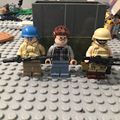


I was so excited to print the 4 cyl that i paid for it well. Enjoy and nice work