


Any chance you could whip up a clock model based on a Doxa Sub 300T with the orange face?
- 「いいね」数:0
👋 みなさん、こんにちはここは公開スレッドですので、お互いに親切に敬意を払って交流しましょう。広告、スパム、不快な投稿は禁止です!
🇨🇦ユーザーの国:カナダ
🌐 メンバーの優先言語:英語。 DeepL でオンライン翻訳を利用できます。
💡 特定のモデルについて話している場合は、リンク、タイトル、またはモデル番号を追加してください。
🖼️ 写真を投稿したい場合は、ImgBBなどの無料ホスティングサービスを利用して、メッセージ内にリンクを貼り付けてください。
✍️ 書き方のヒント:Markdown 形式を使って、文章を構造化し読みやすくしましょう。
Any chance you could whip up a clock model based on a Doxa Sub 300T with the orange face?
this is a zip file and can not be opened
the stl files won't download for the rolex clock
Hi. It's a zip file so make sure you extract it. If it's not downloading I would try again in a little while. Could just be a website issue.
it's showing as a file but nothing in it. i will keep trying. i did extract all and it shows in list but when i try to import it in my slicer nothing loads
Sounds like your slicer is the problem and doesn't accept the file type. Make sure to update your slicer.
it's orca and updated. is it a stl file?
Right click the file and click properties. The file type will be shown
the file says 3d winnipeg file folder and nothing showing for size. when i click on it again it say rolex-wall-clock and no file size
properties say read only
Please try a different software there does seem to be any issues with the file on our end
Try Prusa, Bambu or another slicer.
Hello
what the biggest piece
thank you
hallo ich habe einProblem mit der datei, diese ist an beiden Enden geschlossen.
Wie soll da eine Blume hinein.
Kann mir jemand helfen??
Hi, love the work you've done on the Rogue One tank.
I have a printer that should be big enough to print the tank in halves, I see you have the two scalable halves in the files. What percent size do you recommend printing those two pieces at to achieve 1/12 scale?
Thank you for your help.
Hi... I purchased the pinball machine that you made but I am not able to find it via my slicer. I use Qidi. I am able to find it using Ideamaker but that is not the machine I want to print this on. I even tried uninstalling Ideamaker so this would work on Qidi. It also does not work on the Creality slicer either. Any advice? I really want to print this model.
Hi. Try exporting from ideamaker as an STL and then look for it. It's just a file type that may not be supported by the others.
bonjour j'ai acheter le vase filament car je le trouver jolie et j'aime l'idée de pouvoir changer sa couleur, mais j'ai un petit problème c'est que je suis débutante dans l'impression et quand j'ai voulu regarder le fichier sur cura j'ai remarquer qu'il étais plein. je fait comment? car le fichier est inutile pour moi si au final je ne peut pas mètre mais fleur dedans!
hello I bought the filament vase because I find it pretty and I like the idea of being able to change its color, but I have a small problem which is that I am a beginner in printing and when I wanted looking at the file on cura I noticed that it was full. how do I do it? because the file is useless for me if in the end I cannot meter but flower in it!
Hi. You must use the spiral vase setting in your slicer.
I HAVE PURCHASED THE DESIGN OF THE WATCH BOX.
THE DESIGN SEEMS BRUTAL TO ME
IS THE COVER WITHOUT THE CLOCK POSSIBLE?
Hi, i thought this would be hollow vase but in my bambu studio it does not show any hollow vase in this. Please is there a setting i am missing or something. Please help
in your bambu slicer go to special mode --> spiral vase
I was able to figure out. Thank you for replying though. Its a beautiful vase.
ciao amico, bel lavoro il tuo orologio.Ma c'e' un problema se puoi risolverlo: la scitta è bucata inizia la stampa dal primo layer e si vede nel dietro.
Hello, do you know the number of printing hours? Approximately. Imperial assault tank, THANKS
The vase imports as a solid object, not as a vase. Solid top and solid bottom.
hallo, darf ich die ausgedruckten Sachen verkaufen?
No, sorry
Hi I have just purchased some of your filament vase stl files. when I load them in Cura there is no open end . Also what infill density should I use ?.
Hello, We are a company that produces filaments for 3D printers. I wanted to ask for a permission: we love your project and would like to buy it, 3D print using our filament and publish the photo after printing on our website.
Hi there thanks for reaching out, yes feel free to use the model for photos
Thank you. :)
Hello! Both me and my dad bought this model and we cannot get rid of the top layer in Ultimaker. It shows the top layer as a solid and we, for the life of us, cannot figure out how to get rid of that top layer when it's printed upright. Please help!
Hey there, using the spiralized outer contour feature in cura should eliminate the top layer - if it doesnt, then go into print settings and ensure number of top layers are set to zero and infill percentage is also zero - this is how to hollow out the object without setting as vase mode - hope this helps
This does not fix the issue. Its the way the file is made. It's solid on top and bottom.
Hi, I have just printed this vase but I cannot get the filament in the grooves. Is there a trick to this? Nicky
I have tried to make this model on my own and cannot get Fusion360 to do what I want. Everytime I twist the surface of the model, it deforms the filament channel. Can yuo tell me the trick or sell me the f3d file ?(assuming you did this in F360)
Thanks!
Paul
P.S. I bought your STL regardless :)
Bonjour
je vient d'acheter le vase mais sur flash print ou autre cura le vase est plein comment définir le retrait de matière interne pour laisser une paroie de 4 ou 3mm par exemple
pour le moment le fichier ne me sert a rien Merci de votre aide
Hi there, the vase was designed to be printed in vase mode specifically as we found that to yield the quickest print time and flawless vase results, if you set cure to spiralized outer contour and a perimeter line thickness of around 0.7mm - 1.3mm (depending on your nozzle size) you will be able to get some nice prints
You could also set the model to 0% infill and no top layers and from there should be able to set the number of perimeters you would like - hope this helps
Hi
I have printed it and it is excellent just a bit weak for vase mode(even on 0.8mm) so can you make solid border around 3-4 mm, I have tried MeshMixer but not good
Please let me know if that is possible would be amazing
Thanks and keep great work :)
@GKAVERY Hi there, I just checked the files and they do appear to be saved as an .STL format, I have re-uploaded them to cults just in case there was any issue, please try to re-download and let me know if you have any better luck - worst case I can send you the files via email to ensure you get them
I just purchased the Rogue One Hover Tank file. I unzipped the files and they were saved as meshmixer document files, not obj files. I can not upload them into my slicer program. Any advice???
@MRIVERA086 I would try contacting at hello@cults3d.com about this issue





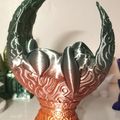


I'm about to attempt printing my purchase of your Waterfall Filament vases. You mention that one can 'mirror' them, but I don't know how to do that in Cura (the only slicer I have that will connect to my printer via USB - it doesn't have a WiFi connection. Can you help me by explaining how I can do that?
By the way, the filaments don't go into the channels as easily as you claim; I had to use a pair of flat-nosed pliers to gently and gradually 'force' them in, once they got to the bends in the channels.